OIDC Configuration
OpenID Connect (OIDC) lets users sign in to RSSMonster through an external identity provider. RSSMonster uses standard OIDC discovery and can connect to any provider that supports the requirements below. Google is used only as a worked example; use your own provider’s issuer and client credentials for other providers.
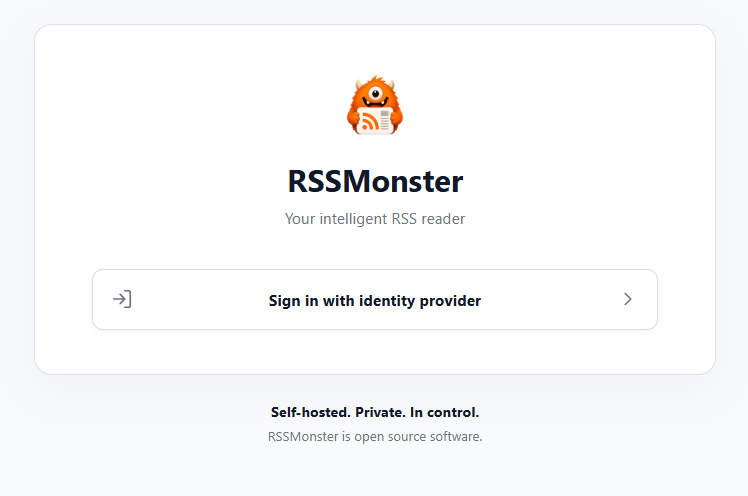
This guide also explains how to show only Sign in with identity provider on the login page.
Before You Start
If you already have an RSSMonster account, link your identity provider to it before disabling local authentication. This preserves your feeds, reading state, and role. For an administrator account, follow Use an Existing Account below first. Automatically provisioned OIDC accounts are ordinary users, including the first account in an empty database; they do not become administrators.
Configure Your Identity Provider
RSSMonster supports one configured OIDC provider at a time. Register RSSMonster as a confidential web application with your provider using these settings:
| Provider setting | Required value |
|---|---|
| Flow / grant type | Authorization Code with PKCE (S256) |
| Client authentication | Client secret in the token request body (client_secret_post) |
| Redirect / callback URI | https://rss.example.com/api/auth/oidc/callback, using your RSSMonster address |
| Scopes | openid profile email by default; openid is required |
The provider must expose OIDC discovery metadata over HTTPS and issue signed ID tokens. Copy its exact issuer URL, including any tenant or realm path, into OIDC_ISSUER_URL. Use the issuer value from the discovery document, not the URL of the discovery document itself. The ID token’s iss must match that configured value exactly, and sub identifies the user within that issuer.
RSSMonster reads identity information from the ID token. If you need email or group restrictions, configure the provider to include those claims there; RSSMonster does not fetch them from the UserInfo endpoint. Verified email requires email_verified to be the boolean true.
Allow the intended users to access the application in your provider’s settings, then copy the client ID and client secret into RSSMonster. Providers that require another client authentication method or do not support this flow need additional integration work.
Configure RSSMonster
For a manual installation, add the following to server/.env. Replace the example issuer, client credentials, and public RSSMonster address with your own:
OIDC_ENABLED=true
OIDC_AUTO_PROVISION=false
OIDC_ISSUER_URL=https://identity.example.com
OIDC_CLIENT_ID=your-client-id
OIDC_CLIENT_SECRET=your-client-secret
OIDC_REDIRECT_URI=https://rss.example.com/api/auth/oidc/callback
OIDC_SCOPES="openid profile email"
LOCAL_AUTH_ENABLED=true
This configuration keeps local login available while you link and test an existing account. Follow Use an Existing Account before setting LOCAL_AUTH_ENABLED=false for the provider-only login page shown above. Set OIDC_AUTO_PROVISION=true if new provider identities should be able to create RSSMonster accounts on their first successful login.
Automatic provisioning defaults to false when omitted: only identities already linked to an RSSMonster account can then sign in. Enabling it permits new identities accepted by your provider and configured RSSMonster access restrictions to create accounts.
OIDC_SCOPES requests identity information. Use openid profile email, not an email address. Keep the client secret in the server configuration.
For Docker Compose, pass these variables through the RSSMonster service’s environment mapping or an explicitly configured env_file. Adding them only to the root .env does not automatically pass them into the container. See Where Configuration Lives.
Restart the server, or recreate the container, to apply the configuration. Open your RSSMonster frontend and refresh the login page. With LOCAL_AUTH_ENABLED=false, it will show the provider button as pictured above, without the local username/password or registration controls.
By default, RSSMonster returns to the callback origin after authentication. Set OIDC_FRONTEND_URL if your frontend uses a different port, as described below. Remote deployments require HTTPS; HTTP callbacks are supported only on loopback addresses for local testing.
Example: Google
For Google, use the same setup above with these provider-specific values:
- Configure your project’s consent screen and audience in Google Cloud.
- Create an OAuth client with application type Web application.
- Add
https://rss.example.com/api/auth/oidc/callbackunder Authorized redirect URIs, replacing the hostname with your own. It must matchOIDC_REDIRECT_URIexactly. For the local development setup below, usehttp://localhost:3000/api/auth/oidc/callbackinstead. -
Set these RSSMonster variables using the credentials from that client:
OIDC_ISSUER_URL=https://accounts.google.com
OIDC_CLIENT_ID=your-google-client-id.apps.googleusercontent.com
OIDC_CLIENT_SECRET=your-google-client-secret
Copy the full client ID as provided by Google. The callback, provisioning, account linking, and local-login settings work the same way for other providers. See Google’s setup documentation for its client and consent configuration details.
Separate Frontend and API Ports in Development
If the API runs at http://localhost:3000/api/ and the frontend at http://localhost:8080, add these server settings:
OIDC_REDIRECT_URI=http://localhost:3000/api/auth/oidc/callback
OIDC_FRONTEND_URL=http://localhost:8080
Keep your provider’s registered redirect URI pointing to port 3000. In the client configuration, set VITE_APP_HOSTNAME=http://localhost:3000 (without /api) so the frontend sends API calls to the backend. Restart both development servers. Open RSSMonster at http://localhost:8080.
The identity provider returns to the API callback, which validates the provider response and redirects to the frontend with a short-lived, single-use handoff code. The frontend removes that code from the address bar and exchanges it at the API for an RSSMonster session. Errors also return to the frontend for display. Provider tokens are never passed to the frontend.
The two URLs must use the same scheme and hostname; only the port may differ. Use localhost consistently rather than mixing it with 127.0.0.1. The server permits credentialed OIDC requests only from the configured frontend origin. If OIDC_FRONTEND_URL is absent, the existing same-origin behavior is preserved.
Sign In with Your Identity Provider
- Select Sign in with identity provider on the RSSMonster login page.
- RSSMonster redirects you to your identity provider to select an account and sign in.
- After successful authentication, the provider redirects you back to RSSMonster.
- RSSMonster validates the response and applies any configured access restrictions. With automatic provisioning enabled, a new identity creates an RSSMonster account and stores its provider identity association in the database.
- RSSMonster establishes your session. Later provider logins return you to the same RSSMonster account and its saved subscriptions and reading state.
New accounts receive a generated username, the ordinary user role, and no local password. A verified provider email is saved during creation. Existing RSSMonster email-verification requirements still apply. Provider passwords are never stored by RSSMonster.
Provider-Managed Email
OIDC-only accounts show a read-only email field in Settings → Account with “Your email address is managed by your identity provider.” Account and email update APIs also reject changes. On each successful OIDC login, a verified provider email is normalized and synchronized to the account. An address change invalidates old verification links; a conflicting email rejects login without merging accounts or overwriting either address. Missing or unverified provider emails do not replace an existing address.
If the provider supplies no verified email and RSSMonster requires email verification, the sign-in email-enrollment flow remains available. After that address is verified, account settings remain read-only; a later verified provider email takes precedence. Existing local accounts with a linked provider identity retain email editing and their locally managed recovery address, even when local authentication is globally disabled.
Use an Existing Account
To retain an existing account, including its administrator role:
- Temporarily keep
LOCAL_AUTH_ENABLED=trueandOIDC_AUTO_PROVISION=falsealongside the OIDC settings above, then restart the server. - Sign in using your existing RSSMonster username and password.
- Open Settings → Account and link your identity provider. Confirm your RSSMonster password, then select your provider account.
- Sign out and test Sign in with identity provider.
- Once provider login works, set
LOCAL_AUTH_ENABLED=falseand restart again.
Keep OIDC_AUTO_PROVISION=false if only previously linked identities should be allowed. RSSMonster never merges accounts automatically by matching email. If a new provider identity has an email already used by a local account, link that local account instead of trying to provision another one.
Disabling local authentication preserves existing accounts and data but also blocks password recovery/changes, password-confirmed linking, development login, and Fever/Google Reader credential authentication. Existing web sessions retain their normal expiry. Re-enabling local authentication restores stored local credentials; it does not create passwords for OIDC-only accounts.
Restrict Access
For a private deployment, configure application access at your provider and, if needed, use RSSMonster’s optional domain or group allowlists. For example:
OIDC_ALLOWED_EMAIL_DOMAINS=example.com
This requires a verified email with that exact domain. It does not identify individual people: allowing gmail.com admits any verified Gmail address that otherwise meets your login and provisioning policies. Leave group restrictions unset unless your provider supplies the configured group claim in its ID token.
See Authentication Policies and OIDC for all settings, defaults, and access restriction semantics.
Troubleshooting
- No provider button: confirm the variables reach the running server, restart it, and refresh the frontend.
/api/auth/configurationshould reportoidcEnabled: trueand, for the pictured layout,localAuthEnabled: false. - Server refuses to start: check the full client ID, nonempty client secret, issuer, callback URL, and
openidscope. At least one login method must be enabled. - Redirect URI mismatch: the provider’s registered callback and
OIDC_REDIRECT_URImust match exactly, including scheme, port, and callback path. -
Provider sign-in succeeds but RSSMonster rejects login: check whether the identity is linked or automatic provisioning is enabled, whether an email conflicts with an existing account, and whether required access claims are present.
/#oidc-error=failedfollowed by “page not found” on the API port: configureOIDC_FRONTEND_URLas above. The fragment also indicates a callback failure; after fixing the destination, check the server’s[OIDC] callback failedlog category and the account linking/provisioning and restriction settings. Changing the return URL alone does not resolve a rejected identity or invalid provider response.