Filtering Feed Items
An item filter limits which entries from a particular feed enter RSSMonster. Use one when a publisher combines several subjects in the same feed and you only want to retain a subset, or when recurring unwanted items can be identified reliably from their metadata.
Open Settings → Feeds, select the feed, and enter an expression in the Item filter section of the Update feed dialog. Leave the field empty to accept every item.
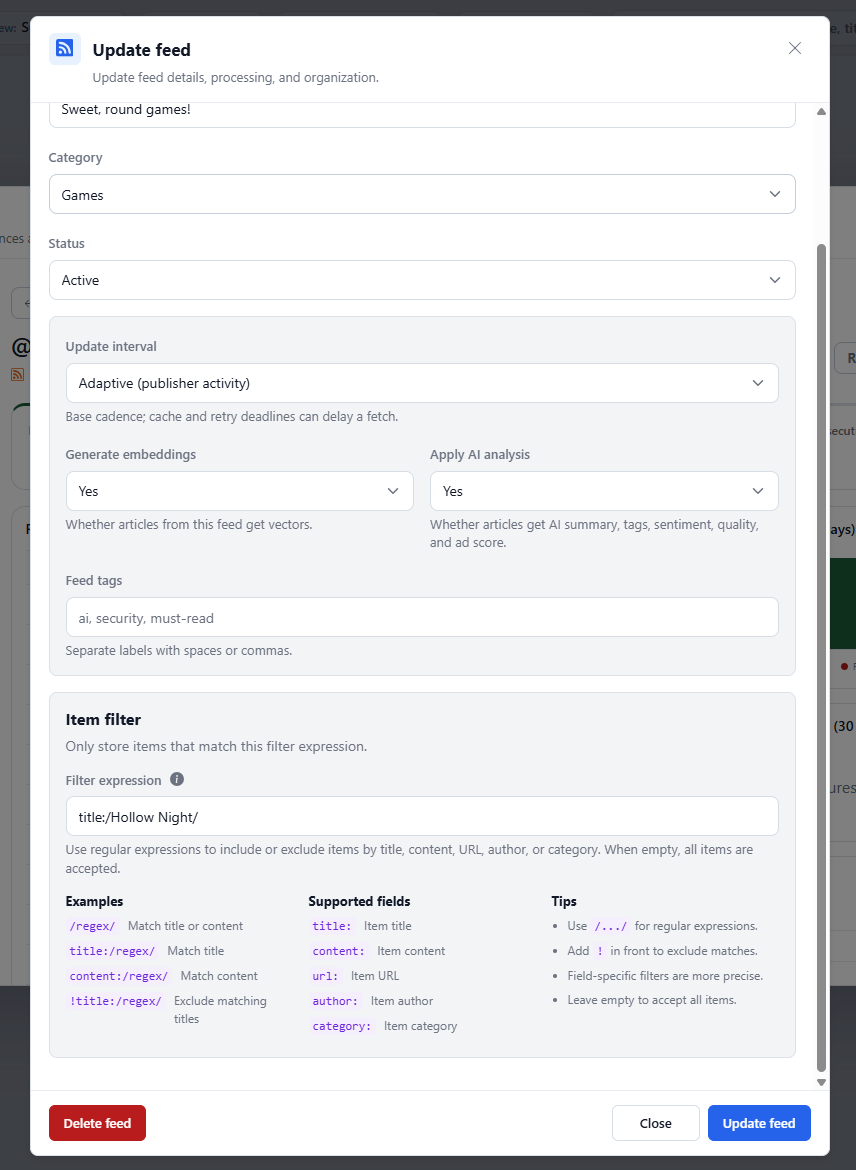
An item filter affects future crawl processing for that feed. It is not a search expression and does not change articles already stored in RSSMonster.
Expression Syntax
RSSMonster supports one slash-delimited JavaScript regular expression, optionally scoped to a field or negated. Matching is case-sensitive unless the expression uses the i flag.
Match Title or Content
An expression without a field name accepts an item when either its title or its content matches:
/Hollow Knight|Silksong/i
Title and content are tested independently. They are not joined into one string. This means an anchored expression such as /^Release/ can match the start of either field.
Match One Field
Prefix the expression with a supported field and a colon to inspect only that field:
| Expression | Value inspected |
|---|---|
title:/release/i | Item title |
content:/security update/i | Normalized text content |
url:/\/games\// | Item URL supplied by the feed |
author:/Jane Doe/i | Item author |
category:/technology/i | Each category supplied for the item |
For content matching, RSSMonster uses the normalized article body and falls back to the item description when the body has no text. A category filter accepts the item when any one of its categories matches.
Forward slashes inside the pattern must be escaped. For example, this filter accepts HTTPS URLs under an /articles/ path:
url:/^https:\/\/example\.com\/articles\//
Standard JavaScript regular-expression flags can follow the closing slash. The i flag for case-insensitive matching is the most commonly useful:
author:/rssmonster reporter/i
See the MDN regular-expression guide for JavaScript pattern syntax.
Exclude Matches
Add ! before an atomic or field-specific filter to reject matching items and keep everything else:
!title:/sponsored|advertisement/i
!category:/podcast/i
For a negated field filter, an item without that field is accepted because there is no matching value to exclude. A negated atomic filter rejects an item when its title or content matches.
More Examples
| Goal | Filter expression |
|---|---|
| Keep articles mentioning Linux in the title or body | /linux/i |
| Keep titles beginning with “Release” | title:/^Release/ |
| Keep items in either of two categories | category:/^(technology|science)$/i |
| Keep articles from a particular author | author:/^Jane Doe$/i |
| Exclude promotional titles | !title:/sale|deal|sponsored/i |
| Exclude a URL section | !url:/\/opinion\// |
Only one filter expression can be configured per feed. Use regular-expression alternation, such as /linux|bsd/i, when several values should match.
Validation and Crawl Behavior
The Update feed dialog validates the expression before enabling the update. The server validates it again before saving. During every crawl, RSSMonster compiles the stored expression once for that feed before processing its entries.
If a stored expression is invalid—for example, because it was written by an older client or edited directly in the database—the feed fails with an observable FEED_ITEM_FILTER_INVALID validation error. RSSMonster does not silently accept all items, and the failure does not crash the crawl worker.
The feed still has to be fetched and parsed so RSSMonster can inspect each entry. It also normalizes the entry’s body before content matching. A rejected entry then stops before article identity lookup, image detection, automation, AI analysis, semantic enrichment, or article persistence. This avoids spending classification and embedding resources on content that will not be retained.
Crawl progress and results include a filtered-item count, and structured crawl logs include a filtered=<count> field. The count also includes items discarded by existing ingestion automation rules.
Non-Retroactive Filtering
Item filters apply only as entries are encountered in later crawls:
- Saving or changing a filter does not scan, hide, or delete existing articles.
- A rejected item does not leave an article identity row in the database. If the publisher still includes it after the filter changes, RSSMonster evaluates it again.
- If an article was previously accepted but a later publisher revision no longer matches, RSSMonster keeps the last accepted version. The rejected revision does not update, hide, or delete it.
Use Search or a Smart Folder when you want a dynamic view over articles that are already stored. Use an item filter only when the unwanted entries should not enter the article library at all.