Fever API
RSSMonster provides a Fever-compatible API for connecting third-party RSS clients. The implementation reports Fever API version 3 and synchronizes the authenticated user’s feeds, categories, articles, unread state, and saved articles.
The endpoint is:
https://your-rssmonster.example/api/fever
Use HTTPS whenever RSSMonster is accessed over a network. Fever clients derive an API credential from the RSSMonster username and password, so the connection must not be sent over unencrypted HTTP.
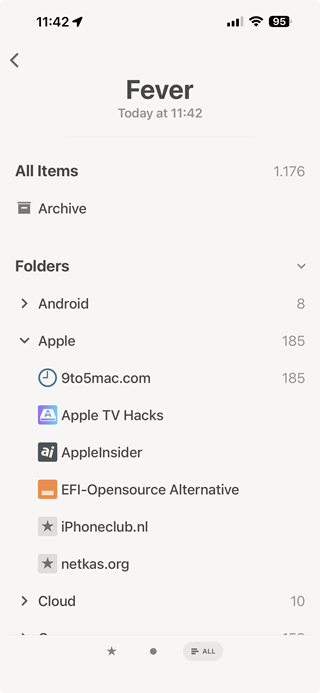
Connecting a Client
In a client that supports Fever accounts, enter:
| Setting | Value |
|---|---|
| Server or endpoint | https://your-rssmonster.example/api/fever |
| Username or email | Your RSSMonster username |
| Password | Your RSSMonster password |
Some clients ask for the server address and append /api/fever themselves; others require the complete endpoint. Check the previewed URL before saving the account and make sure /api/fever appears exactly once.
RSSMonster has been used with Fever support in Reeder. Other clients may work when they follow the same Fever API version 3 protocol, but behavior can differ because the original Fever ecosystem was not completely uniform.
Authentication
The standard Fever wire credential is the 32-character MD5 value of:
username:password
Compatible clients normally calculate and submit this value automatically as api_key; users should enter their normal RSSMonster credentials rather than manually generating a key.
RSSMonster does not store that Fever key directly. During registration it creates a keyed lookup hash using FEVER_CREDENTIAL_SECRET. The API then uses that protected value to identify the correct user. Authentication and every subsequent query remain scoped to that user.
The server also accepts the older action=login username-and-password flow and issues an HTTP-only fever_auth cookie lasting 24 hours. This exists for legacy client compatibility. Direct api_key authentication is the normal Fever protocol path.
An unauthenticated or invalid request returns HTTP 200 with the standard Fever envelope:
{
  "api_version": 3,
  "auth": 0
}
A successful request contains "auth": 1 and last_refreshed_on_time, derived from the user’s most recent feed fetch.
Credential-secret requirement
The server must have a stable FEVER_CREDENTIAL_SECRET. Changing it prevents existing stored Fever credential hashes from matching client keys. See Configuration.
When an administrator changes a user’s username, the password should be submitted as part of the same user update so RSSMonster can regenerate the Fever credential. A password change also requires the client account to be updated.
Response Formats
JSON is returned by default. Add api=xml to request the Fever XML envelope:
POST /api/fever?api=xml&feeds=
The value is case-insensitive. RSSMonster accepts supported Fever parameters from form-encoded POST data or the query string. Collection requests can be combined, allowing a client to request feeds, groups, items, and state lists in one response.
Supported Collections
Groups and feeds
groups returns RSSMonster categories as Fever groups. feeds returns the user’s subscribed feeds, and requesting either collection also includes feeds_groups, which maps each category to its feed IDs.
Feed responses contain:
- the RSSMonster feed ID;
- feed name and URL;
- a favicon ID matching the feed ID;
is_spark: 0; and- the last successful feed-fetch time.
Fever groups and feeds are read-only through this compatibility endpoint. Create, edit, move, or delete subscriptions in RSSMonster itself.
Unread and saved IDs
Use unread_item_ids and saved_item_ids to retrieve comma-separated lists of canonical article IDs. Saved items correspond to RSSMonster Favorites or Bookmarks.
Known duplicate records are excluded. This keeps one canonical item in the client while RSSMonster retains its internal duplicate relationships.
Items
Add items to retrieve article records. Each item contains its article and feed IDs, title, author, URL, publication timestamp, read and saved flags, and sanitized article HTML. When sanitized HTML is unavailable, RSSMonster falls back to the sanitized description HTML.
Responses contain at most 50 items. The supported selectors are:
| Parameter | Behavior |
|---|---|
with_ids=1,2,3 | Return up to the first 50 unique, valid requested IDs in ascending order. |
since_id=123 | Return the next 50 IDs greater than 123, in ascending order. |
max_id=123 | Return the previous 50 IDs below 123, in descending order. |
max_id=0 | Start backward pagination with the newest 50 items. |
| no selector | Return up to 50 items from the beginning of the ID sequence. |
total_items reports the total number of the user’s canonical articles, not the size of the current page.
Favicons
favicons returns cached, embedded favicon data for owned feeds when it is a validated PNG, GIF, JPEG, WebP, or ICO image. A feed whose favicon is only a remote URL, is malformed, or has an unexpected file signature is omitted from this collection.
Hot Links
links exposes RSSMonster’s stored Hot Link observations in Fever’s Links shape. URLs are grouped across their source articles, and temperature represents the number of distinct source articles that linked to that URL.
The supported paging parameters are:
| Parameter | Default | Meaning |
|---|---|---|
range | 7 | Number of days in the observation window. |
offset | 0 | Number of days to move the window into the past. |
page | 1 | 50-link result page. |
When a URL matches a canonical local article, the response includes its item, feed, and saved state. External URLs use item_id: 0, feed_id: 0, and are marked as non-local.
This is a compatibility projection of RSSMonster Hot Links, not a recreation of Fever’s original ranking algorithm.
Updating Article State
Fever mutations can be supplied in the query string or form body.
Individual items
The following combinations are supported for mark=item:
as value | RSSMonster change |
|---|---|
read | Sets the article to read and records readAt. |
unread | Sets the article to unread and clears readAt. |
saved | Adds the article to Favorites. |
unsaved | Removes the article from Favorites. |
id may contain a comma-separated list of up to 50 unique article IDs. Foreign, duplicate, malformed, and non-positive IDs are ignored.
For example:
POST /api/fever
api_key=<fever-api-key>&mark=item&as=read&id=101,102
After a successful mutation, RSSMonster returns the current unread_item_ids or saved_item_ids list so the client can reconcile state.
Feeds and groups
Feeds and groups support marking articles as read:
mark=feed&as=read&id=<feed-id>&before=<unix-timestamp>
mark=group&as=read&id=<group-id>&before=<unix-timestamp>
Only unread canonical articles owned by the authenticated user and ingested at or before the cutoff are changed. Articles ingested later remain unread even if their publication date is older. RSSMonster accepts the before value in Unix seconds or milliseconds. If it is missing or invalid, the current time is used. Articles already read retain their original reading timestamps.
Group ID 0 means all feeds. Group ID -1 represents Fever’s Sparks super group, but RSSMonster currently has no Sparks feeds, so that mutation performs no article update.
Feed-level saving and group-level unread or saving mutations are not supported. Unsupported combinations return the authenticated Fever envelope without changing state.
Recently read items
Sending unread_recently_read=1 marks articles read within the previous 24 hours as unread and clears their readAt value. Older read articles remain unchanged.
Compatibility Summary
| Capability | Support |
|---|---|
| Fever API version 3 envelope | Yes |
| JSON and XML | Yes |
| Categories as groups | Yes |
| Feed and group mapping | Yes |
| Item synchronization and pagination | Yes, 50 items per page |
| Unread synchronization | Yes |
| Saved/starred synchronization | Yes |
| Mark individual items read, unread, saved, or unsaved | Yes |
| Mark a feed, category, or all feeds read | Yes |
| Revert items read during the previous 24 hours | Yes |
| Embedded favicons | Yes, for validated cached image data |
| Hot Links | Yes, projected from RSSMonster observations |
| Add, edit, move, or remove subscriptions | No |
| Sparks feeds | No |
| Delete articles through Fever | No |
Troubleshooting
The client reports that authentication failed
- Confirm that the endpoint ends in
/api/feverexactly once. - Sign in to RSSMonster with the same username and password.
- Confirm that the public URL uses HTTPS and reaches the RSSMonster server.
- If the username or password changed, update the client account.
- Ask the administrator whether
FEVER_CREDENTIAL_SECRETchanged. It must remain stable after accounts have been created.
The Fever protocol reports invalid credentials as HTTP 200 with auth: 0, so an HTTP success status alone does not mean authentication succeeded.
Feeds appear but some favicons do not
The Fever endpoint only returns locally cached base64 image data with a recognized MIME type and matching file signature. Remote favicon URLs are intentionally omitted.
New articles do not appear immediately
The Fever endpoint reads RSSMonster’s database; it does not trigger a feed crawl. Refresh or schedule feed crawling in RSSMonster, then synchronize the client again. last_refreshed_on_time reflects the newest stored feed-fetch timestamp.
An unsupported client feature does nothing
RSSMonster safely ignores unsupported mutation combinations. Manage feed subscriptions, categories, and unsupported article actions in the RSSMonster web interface.