Events
An Event groups articles that report on the same real-world occurrence. Instead of showing five isolated articles about one announcement, RSSMonster can show one story with the other coverage available underneath it.
Examples of Events include:
- a company announcing a new product;
- an election result;
- a court issuing a particular ruling; or
- a storm making landfall in a specific place.
An Event answers what happened? It is not a feed category, a long-running subject, or a model of the user’s interests. Those broader responsibilities belong to and Interest Islands.
How Events Are Created
Event processing runs after articles have been persisted and embedded:
Article
   |
   v
Look for a matching Event
   |
   +-- strong match ----------> Join the existing Event
   |
   v
Look for corroborating articles
   |
   +-- enough evidence -------> Create a new Event
   |
   v
Remain a standalone article
RSSMonster does not create a one-article Event. By default, a new Event needs at least two matching articles. Requiring those articles to come from at least two feeds is an optional server setting.
This means that many articles will have no Event. That is expected: an article may be unique, may not have enough corroborating coverage yet, or may not have a usable embedding.
Matching Evidence
Semantic similarity is the primary matching signal. RSSMonster compares the article’s vector with recent Event vectors using cosine similarity. A match must also have supporting evidence from the article’s timing and at least one of the following:
- overlap between headline terms;
- overlap between names and other entities; or
- particularly strong near-duplicate headline evidence.
By default, an article must reach a semantic similarity of 0.84 to join an Event through the normal matching path. Similarity alone does not guarantee a match. The Event window is limited to 24 hours by default, preventing stories that discuss the same subject at very different times from being merged into one occurrence.
When no existing Event qualifies, RSSMonster also searches nearby articles. It considers both articles that already belong to an Event and standalone articles. Consistent evidence pointing toward an existing Event is preferred; otherwise, enough corroborating standalone articles can establish a new one. Both discovery paths use the same Event-level policy before assignment. The proposed complete Event span must satisfy the time window; a close match to one member cannot extend an Event indefinitely through a chain of articles.
When multiple Events qualify without a clear evidence-score winner, the Article remains unassigned and can be reconsidered during a later assignment pass. EVENT_MIN_WINNER_MARGIN controls this conservative ambiguity rule (default 0.03 before recency decay). Supporting-member count does not override stronger occurrence evidence. New Event proposals also validate their entire seed group before membership is written.
The shared policy also checks deterministic occurrence hints from titles and descriptions. Explicit versions for the same product and incompatible incident locations can reject an otherwise strong semantic match. An existing-product price cut conflicts with a new-generation launch; ordinary launch pricing and pre-order coverage remain compatible. Missing hints are neutral, and differing action words alone only reduce the match score slightly.
Event hints require agreement among supporting members rather than relying on the Event name. Assignment rechecks these hints against committed members under the membership lock. Extraction uses no inference calls or persistent fields.
Candidate searches are bounded. RSSMonster orders nearby articles by their publication-time distance and compares at most the best 300 candidates. This keeps clustering predictable as an account’s history grows.
Events and Duplicates Are Different
Deterministic article identity and duplicate detection happen before Event assignment. Those checks identify repeated feed entries, revisions, and known duplicate content.
Events instead connect separate articles that cover the same occurrence. Different publishers can report on one Event without their articles being duplicates. A semantic resemblance therefore never overrides the normal article identity rules.
See Article Embedding for how the comparison text and vectors are produced.
What an Event Stores
Event summary data is derived from its canonical member articles. It includes:
- the number of articles;
- the number of distinct source feeds;
- the start and end of the coverage window;
- an aggregate Event vector made by averaging member article vectors;
- source-diversity and Event-strength scores; and
- a lifecycle status.
RSSMonster updates this projection whenever membership changes. Event membership itself is stored on each article, so an article belongs to at most one Event. All Events and their articles remain scoped to their owner in a multi-user installation.
Event strength
Event strength is a 0.0–1.0 ranking signal. In the current implementation, it combines the amount of corroborating coverage with fixed cohesion and baseline contributions. Additional articles increase the coverage contribution up to its configured cap.
It helps RSSMonster rank meaningful, well-supported stories. It is not used as the initial proof that an Event exists and is not a truthfulness rating.
Event lifecycle
Events move through four lifecycle states:
- Emerging: fresh coverage with no more than two articles by default.
- Active: fresh coverage with more corroboration.
- Cooling: the most recent coverage is more than 24 hours old by default.
- Archived: the most recent coverage is at least 96 hours old by default.
Lifecycle describes the age and activity of an Event. It does not determine which article represents it in the interface.
Representative and Developing Articles
Each Event maintains two article pointers with different purposes.
The representative article is the Event’s stable anchor. It supplies the Event’s initial display identity and remains unchanged when newer articles join during normal incremental processing.
The developing article represents a later wave of unread coverage. It is a sticky pointer: while the selected article remains unread, still newer reports do not replace it. After the current coverage has been read, an unread article that arrives later can become the developing article while the original representative remains intact.
This prevents an Event the user has already consumed from disappearing merely because its original representative is read. In Tune your unread selection, enable Developing events to include new coverage for Events you have already seen. This preference changes presentation only; RSSMonster maintains the developing pointer either way.
Viewing Event Coverage
When AI-backed features are available, choose Events from the Grouping control. RSSMonster displays one selected article for each Event instead of repeating every related article in the main list.
Grouped articles show a similar articles count. Select that label to expand the other articles directly below the parent. A source badge can also show how many distinct feeds corroborate the Event. Select the label again to collapse the group.
Ungrouped mode continues to show the articles individually. Changing the grouping changes presentation, not Event membership.
Marking a Grouped Event Read
When an Event-grouped card is marked read, RSSMonster marks all currently linked unread canonical articles in that Event as read. This acknowledges the whole coverage group at once.
When grouping is None, marking an article read changes only that article; other Event members retain their own reading state. Event assignment itself never changes an article from unread to read or copies reading state between members.
If new coverage joins after the grouped Event was consumed, it can start a new developing wave and appear again when Developing events is enabled. See Marking Articles Read for the other ways reading state can be updated.
Inspecting Event Health
The read-only Settings > Events page provides an operational overview of all Events. It shows Event coverage, unclustered articles, reuse and creation ratios, average Event size, lifecycle distribution, and recent Event records.
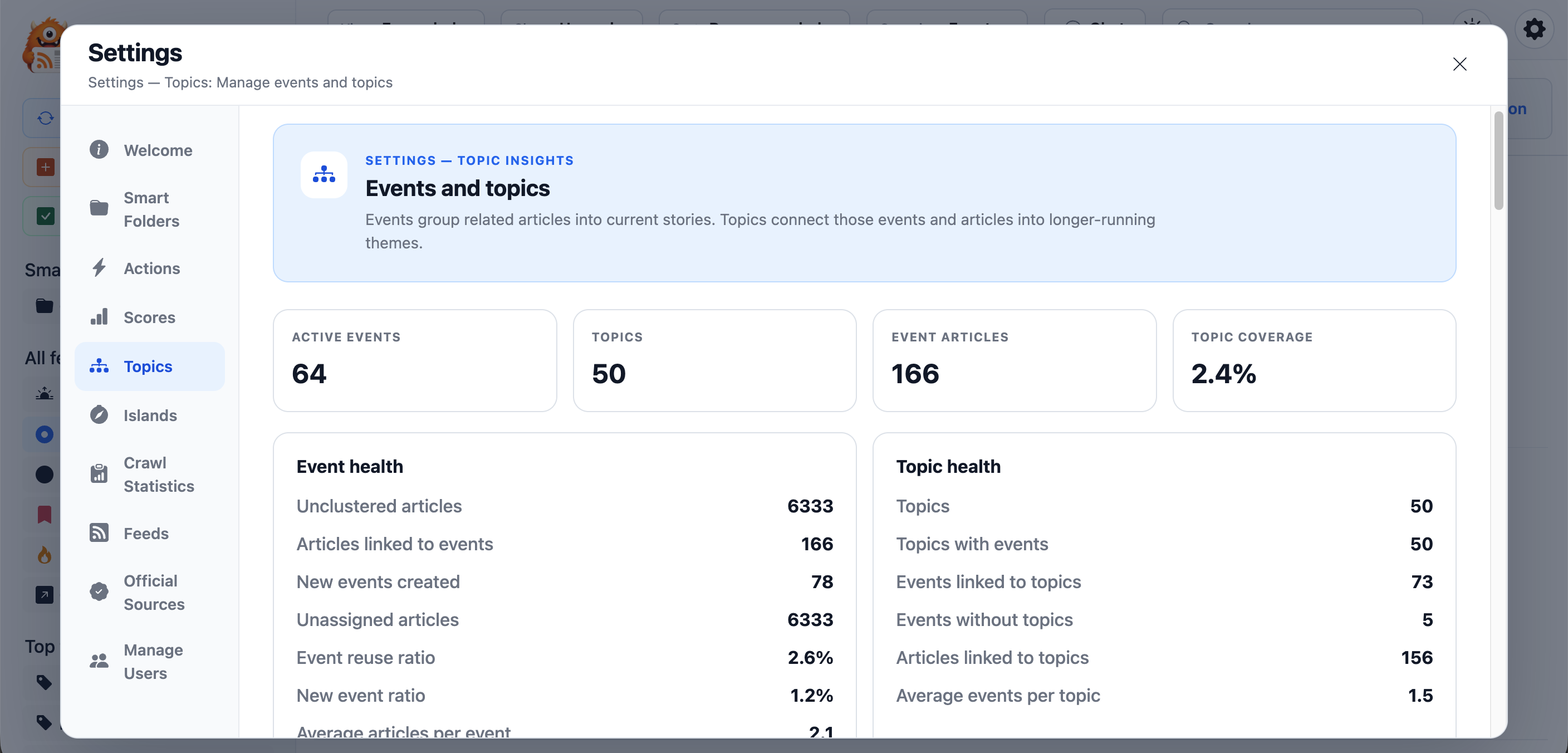
The Event insights overview summarizes clustering health across the user’s article library.
Large numbers of unclustered articles are not automatically a problem. Events are intentionally conservative and standalone articles are valid.
Advanced Server Tuning
Individual categories can override the normal existing-Event matching threshold with Aggressive, Moderate, or Conservative, or follow Server default. See Category Event clustering for recommendations, stored values, and the scope of these preferences.
Most installations should keep the defaults. Administrators evaluating Event quality can tune these server environment variables:
| Variable | Default | Effect |
|---|---|---|
EVENT_SIM_THRESHOLD | 0.84 | Minimum semantic similarity for the normal existing-Event match. Higher values reduce merging and may create more fragmentation. |
EVENT_MAX_GAP_HOURS | 24 | Hard maximum span for one Event’s article coverage. |
EVENT_RECENCY_HALF_LIFE_HOURS | 18 | Controls how quickly older Event candidates lose matching weight. |
EVENT_MIN_HEADLINE_SIM | 0.22 | Minimum headline overlap that can corroborate a semantic match. |
EVENT_MIN_SHARED_ENTITY_OVERLAP | 1 | Minimum shared-entity count that can corroborate a semantic match. |
MIN_EVENT_ARTICLES | 2 | Minimum corroborating article count needed to create an Event. |
REQUIRE_MULTI_SOURCE_FOR_EVENT | false | When enabled, require multiple source feeds before creating an Event. |
MIN_EVENT_SOURCES | 2 | Required source count when multi-source creation is enabled. |
EVENT_ACTIVE_FRESH_HOURS | 24 | Age after which fresh coverage becomes cooling. |
EVENT_COOLING_HOURS | 96 | Age after which an Event becomes archived. |
EVENT_EMERGING_ARTICLE_MAX | 2 | Largest fresh Event still classified as emerging. |
RECENCY_WINDOW_DAYS | 7 | Window used by recent Event repair. |
Thresholds interact with one another. Evaluate changes across several feeds and users: settings that merge more coverage can also combine distinct stories, while stricter settings can split one story into several Events.
For diagnostics, EVENT_DEBUG=true enables detailed matching decisions. The logs contain scores and candidate identifiers but do not print full vectors.
Historical Processing
Normal crawling assigns only newly created, canonical, unfiltered articles. Article reading state does not affect eligibility, and Event assignment preserves that state.
The historical semantic command can fill missing Event assignments for vectorized articles and then rebuild higher semantic layers:
cd server
npm run semantic:all
To limit it to one user:
npm run semantic:all -- --userId=3
Historical Event processing preserves valid existing assignments and reuses stored vectors. It does not generate embeddings for articles that do not already have one. Run repair or rebuild commands deliberately, especially on large libraries, because they perform substantial database and semantic work.
Decision diagnostics and regression limits
The Event service README is the technical reference for occurrence decisions and diagnostic fields. Debug/semantic reports include candidate similarities, temporal/span checks, feature match/conflict flags, scores, decisions and machine-readable reasons without article bodies or vectors. IDs are diagnostic; tests assert membership relationships rather than fixed IDs.
The semantic regression suite protects incremental reuse, adversarial version/location/action pairs, ambiguous/Eventless coverage, multilingual matching, and legitimate updates such as changed casualty counts, corrections and announcement → pricing → preorder. Missing occurrence features are neutral. These cases do not establish perfect clustering across languages or processing order. Interest affinity is evaluated separately from occurrence identity.