Generated Feeds
Generated Feeds expose a dynamic selection of articles from RSSMonster as a standard RSS 2.0 feed. They are useful when you want to read a focused subset of your RSSMonster content in another RSS reader, automation, or service.
Why this is useful
A Generated Feed turns an RSSMonster expression into an interoperability boundary. Its URL can be consumed by another RSS reader, an automation, a service, or a person. This can be useful even when RSSMonster is not your primary reader.
For example, RSSMonster can act as an RSS filtering proxy. Suppose a website publishes one enormous feed containing 200 articles a day, but you only care about cybersecurity. Subscribe to the source in RSSMonster, create a Smart Folder such as:
tag:security quality:>0.6 sort:quality
Then create a Generated Feed with the same expression. A downstream application sees only the matching, higher-quality security articles instead of the entire source feed. The quality value is RSSMonster’s normalized 0.0–1.0 article-quality score, which includes the advertising score; a higher advertising score means the article is less promotional. See Scoring and Ranking for the complete calculation.
Other examples include:
- Curated feeds for other people. Follow 150 sources privately, then give colleagues a focused feed such as Piethein’s Data & AI Picks containing only articles you consider useful.
- Processing pipelines. Feed a narrowly selected stream into local LLM inference, an ONNX model, or another small-model service for downstream classification, extraction, summarization, or automation.
The generated URL is a bearer secret rather than a public publishing control. Share it only with the intended readers or systems; the access and token security section explains how to disable a feed or invalidate an old URL.
A Generated Feed combines two things:
- a saved expression using the same language as Search and Smart Folders;
- a private URL containing a random access token.
RSSMonster evaluates the expression whenever the URL is requested. It does not copy articles, create another subscription, or maintain a separate list of feed items.
Generated Feed configuration
        |
        +-- saved Search/Smart Folder expression
        +-- private access token
        |
        v
Shared expression engine
        |
        v
Current matching articles (maximum 50)
        |
        v
RSS 2.0 document
Create a Generated Feed
- Open Settings and select Generated Feeds.
- Select Create Generated Feed.
- Enter a name and, optionally, a description.
- Enter an expression and select Validate.
- Leave Enabled selected if the feed should be available immediately.
- Select Create Feed.
- Copy the generated RSS URL into the reader or service that will consume it.
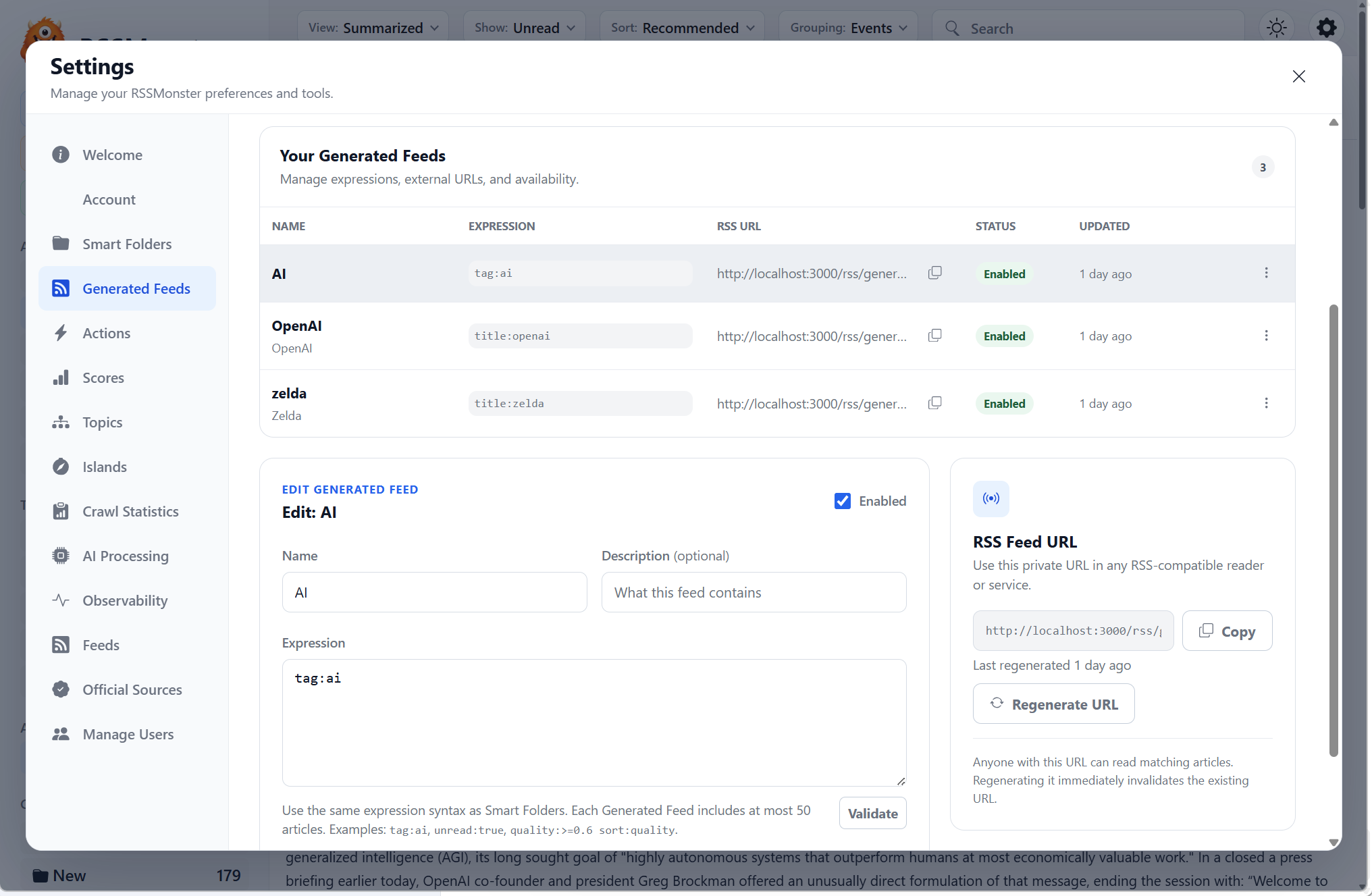
The overview shows each feed’s expression, URL, status, and last update. Select a row to edit its configuration. The actions menu can copy the URL, enable or disable the feed, regenerate its URL, or delete the configuration.
Expressions
Generated Feeds use the same parser and query execution path as Search and Smart Folders. An expression that is valid for a Smart Folder is valid for a Generated Feed; there is no separate feed-specific query language.
Examples:
tag:ai
title:openai
unread:true @today sort:desc
tag:security quality:>=0.7 sort:quality
event:true eventCount:>=3 sort:topStories
Expressions can select by text, title, author, tag, language, read state, favorite state, dates, scores, Events, Interest Islands, and other supported article properties. They can also control ordering with tokens such as sort:desc, sort:asc, sort:quality, sort:recommended, and sort:topStories.
See the Search Guide for the complete syntax and Smart Folders for examples of reusable article selections.
Request-time generation
The public URL has this form:
https://rssmonster.example/rss/generated/<token>
For every request, RSSMonster:
- resolves the token to an enabled Generated Feed;
- obtains the owning user without requiring a normal login or JWT;
- executes the saved expression through the shared article-search service;
- restricts all database results to that owner;
- applies the expression’s requested ordering, defaulting to newest first;
- limits the result to at most 50 articles;
- loads the matching canonical articles in that exact order;
- renders and returns an RSS 2.0 document.
The result is always calculated from the current article database. New matching articles therefore appear automatically, while articles that stop matching are removed on the next request. Generated Feeds do not use pagination and cannot raise the 50-item public-feed ceiling with a larger limit: expression.
Ranked expressions are also bounded internally. RSSMonster considers at most 500 candidates when applying rankings such as Quality, Recommended, or Top Stories, then returns no more than 50 results. This keeps a public feed request from turning into an unbounded database or in-memory operation.
RSS output
Generated Feeds share the same renderer as RSSMonster’s authenticated RSS export. The channel contains the Generated Feed name and description, its canonical self URL, language, and build time. Each item can contain:
- the article title and publisher URL;
- a stable, origin-scoped GUID;
- the publication date;
- sanitized article HTML in the description;
- the source feed name as its category.
The endpoint returns application/rss+xml. GUIDs are marked as non-permalink identifiers, and the document includes an Atom rel="self" link plus a matching HTTP Content-Location header for reader interoperability.
RSSMonster sanitizes article HTML when it is collected and defensively sanitizes stored HTML again while rendering RSS. Unsupported elements and unsafe URL attributes are removed. Valid responsive image sources inside a picture element are preserved; orphaned source elements are discarded so they do not create invalid item HTML.
Access and token security
The token in the generated URL is a bearer secret. RSS clients can use it without signing in, so anyone who has the complete URL can read the articles selected by that feed.
- Keep the URL private and avoid publishing it in screenshots or logs.
- Disabling a Generated Feed makes its public URL unavailable without deleting the configuration.
- Regenerating the URL immediately invalidates the previous token. Existing RSS clients must be updated with the new URL.
- Deleting a Generated Feed removes only its configuration. It does not delete subscriptions or articles.
- Missing, disabled, deleted, and superseded tokens all return the same not-found response so the endpoint does not reveal token state.
Tokens are generated from 32 cryptographically secure random bytes and are not derived from a user ID or Generated Feed database ID. Management operations remain authenticated and always check ownership.
Managing feeds through the API
The Settings page uses authenticated endpoints under /api/generated-feeds:
| Operation | Endpoint |
|---|---|
| List feeds | GET /api/generated-feeds |
| Create a feed | POST /api/generated-feeds |
| Read one feed | GET /api/generated-feeds/:id |
| Update a feed | PUT /api/generated-feeds/:id |
| Delete a feed | DELETE /api/generated-feeds/:id |
| Regenerate its token | POST /api/generated-feeds/:id/regenerate-token |
Create and update requests validate expressions before persistence. A name or expression change does not rotate the token; rotation happens only through the explicit regeneration operation.
The RSS endpoint is deliberately outside the authenticated management API:
GET /rss/generated/<token>
It authenticates only through the private token and does not accept a JWT as a replacement for that token.
Validation and troubleshooting
The URL opens the login page
Make sure the URL starts with /rss/generated/ and contains the complete token. This route is excluded from the application’s navigation fallback and does not require a login. If an older installed PWA cached the login fallback, reload after its service worker has updated or open the URL directly in a new browser tab.
The feed returns not found
Check that the feed is enabled and that its URL has not been regenerated. RSSMonster intentionally returns the same response for an unknown, disabled, deleted, or superseded token.
An expected article is missing
- Run the same expression in Search or a Smart Folder and confirm it matches.
- Check status and date filters such as
unread:trueor@today. - Remember that score filters run after eligibility checks and can reduce the result count.
- Check the expression’s ordering and the 50-item output limit.
A feed validator reports a self-reference mismatch
Validate the feed by URL when it is reachable from the validator. Pasting XML as direct input does not give the validator the original document location, so an otherwise correct absolute Atom self-link may be reported as a mismatch.
For a production installation behind a reverse proxy, preserve the external host and protocol in forwarded requests so generated management URLs, Atom self-links, and Content-Location describe the public endpoint.