Article Archiving
Use Cleanup articles in the sidebar to configure how much article history RSSMonster retains. Settings belong to your account and apply both to manual cleanup and the server’s nightly archiving run.
Archiving permanently deletes eligible articles; it does not move them into a separate archive. Your feed subscriptions remain. Use a database backup if you need to recover deleted articles later. An OPML export saves subscriptions, not article content or reading state.
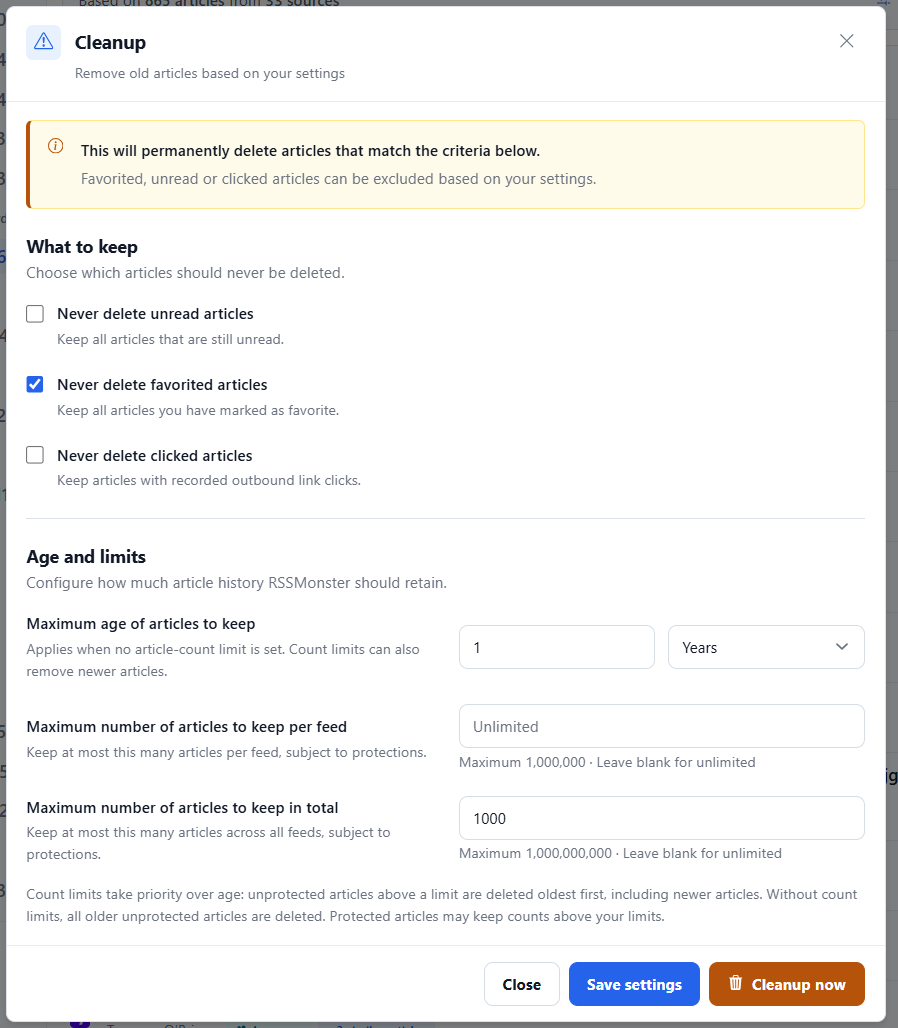
Choose what to keep
These protections take priority over every retention limit:
| Setting | What it protects | Default |
|---|---|---|
| Never delete unread articles | Articles still marked unread. | Checked |
| Never delete favorited articles | Articles saved as favorites or bookmarks. | Checked |
| Never delete clicked articles | Articles with recorded outbound link clicks. Opening an article inside the reader is not an outbound click. | Unchecked |
Protected articles count toward the limits but cannot be deleted by cleanup. If protected articles alone exceed a limit, the retained count stays above it.
Set age and count limits
| Setting | Accepted values | Default |
|---|---|---|
| Maximum age of articles to keep | A positive whole number and Days, Weeks, Months, or Years. | 7 years |
| Maximum number of articles to keep per feed | 1–1,000,000; leave blank for unlimited. | Unlimited |
| Maximum number of articles to keep in total | 1–1,000,000,000; leave blank for unlimited. | Unlimited |
Count limits take priority over age. When either count limit is set, cleanup removes unprotected articles oldest first to satisfy the configured count limits, even if those articles are newer than the age setting. When both count limits are blank, cleanup deletes unprotected articles older than the configured age.
Age uses the article’s publication date, with insertion time as the fallback. Oldest-first ordering for count limits still uses insertion time. Months and years use calendar arithmetic in UTC, clamping to the last valid day of the target month.
After a feed’s initial import completes, unseen articles must fall within both its ongoing admission window (30 days by default) and the user’s maximum article age. The shorter window wins, including when cleanup count limits are configured. Count-based deletions alone do not prevent reimports. Existing articles can still receive revisions. Initial imports and their failed/interrupted retries retain the selected history range. Unread/favorite/click protections apply to stored articles, not to unseen entries. Entries without usable publication dates retain the existing ingestion-time fallback.
The feed stores initialImportCompletedAt after its first fully processed feed representation and ongoingAdmissionWindowDays for the admission window. In Update feed, the ongoing admission window offers 3 days, 1 week, 2 weeks, 1 month, 3 months, 1 year, 3 years, and 5 years. These presets store fixed day counts of 3, 7, 14, 30, 90, 365, 1095, and 1825; the default is 1 month (30 days). Changing the window affects later crawls, without deleting stored articles or restarting the initial import. Migration marks feeds with successful crawl history as established at migration time; that time is not a reconstruction of their original import date.
For example, with Never delete favorited articles checked, an age of 1 year, a total limit of 1,000, and no per-feed limit, cleanup keeps favorites and removes the oldest eligible articles until at most 1,000 stored articles remain. The one-year setting does not protect newer articles in this configuration. Other checked protections still apply, and protected articles may prevent the total from reaching 1,000.
Save or clean up now
- Close dismisses the dialog without saving edits or running cleanup.
- Save settings saves your preferences without deleting articles immediately. The nightly worker uses these saved settings.
- Cleanup now first saves the displayed settings, then runs cleanup. You do not need to press Save settings first. When cleanup completes, the application refreshes and reloads the sidebar counts.
Controls are disabled while saving or cleaning up to prevent duplicate requests. If saving fails, cleanup does not start. A cleanup failure is reported without refreshing the page.
Why the sidebar can show fewer articles
Retention limits count stored article records, while the sidebar counts the articles visible in each view. Duplicate suppression, filtering, score thresholds, read/unread state, and Event grouping affect the displayed counts.
For example, 1,000 stored records might contain 898 unread articles, 100 read articles, and two duplicates. With Event grouping enabled, those articles could appear as 865 unread entries and 85 read entries. Seeing 865 unread does not mean only 865 article records remain.
Nightly cleanup at 03:00
The crawl worker starts archiving every night at 03:00 in the worker’s local timezone (TZ; typically UTC in Docker). It processes users sequentially, applying each user’s saved settings. Accounts without a settings record use the defaults above.
Every completed user cleanup writes a console log, including runs that remove zero articles:
[Archiving] Completed user=42: removed 503 articles.
A failure for one user is logged and does not stop cleanup for the remaining users. Keep the crawl worker running for nightly cleanup; restarting it schedules the next 03:00 rather than replaying missed nights. The standalone desktop app does not run this worker, so use Cleanup now there.