Webhooks
Webhooks send newly saved, matching articles to an HTTP service. Use them to start an automation in a service such as n8n, Node-RED, or Home Assistant. Each webhook belongs to your account and matches articles from your subscriptions.
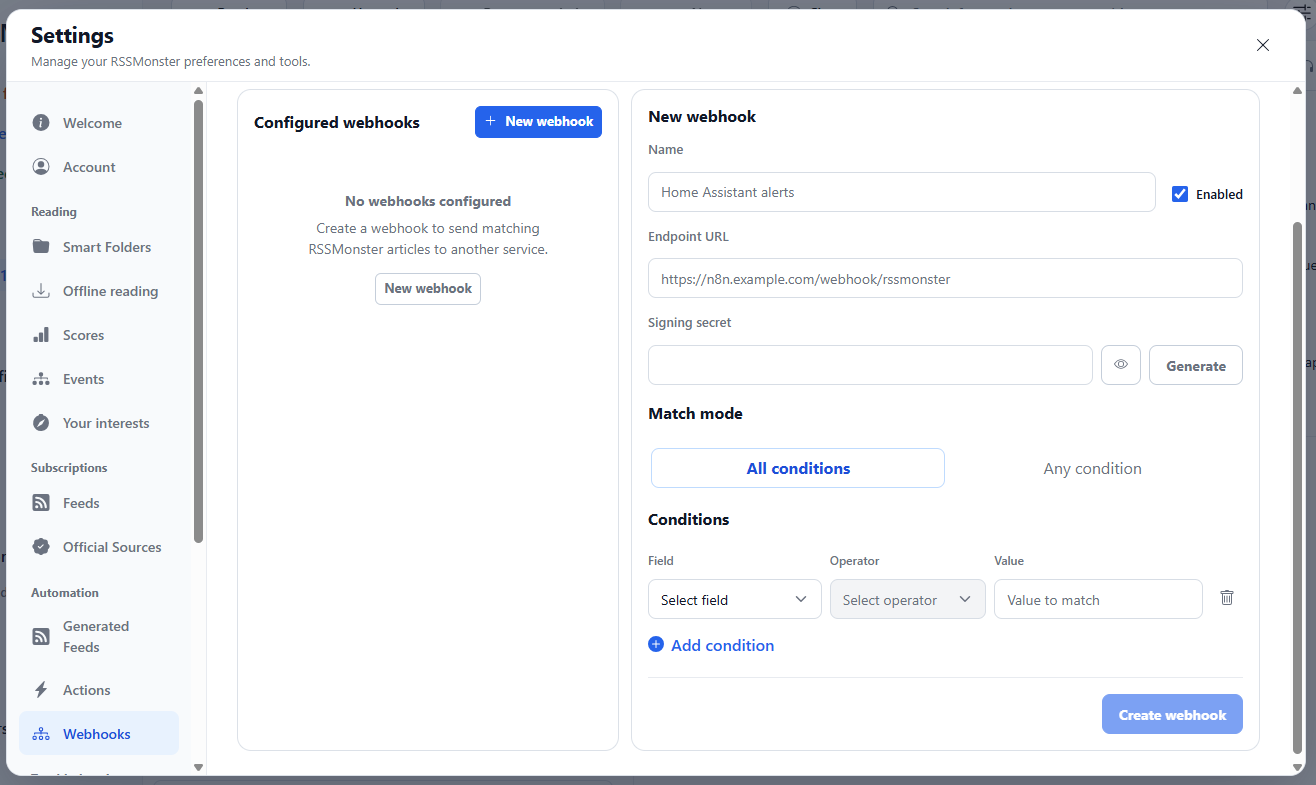
Create a webhook
- Open Settings → Webhooks in the Automation group.
- Select New webhook in Configured webhooks.
- Enter a descriptive Name and the receiving service’s Endpoint URL. Use an HTTP or HTTPS URL without embedded credentials.
- Leave Enabled checked to start matching new articles after saving.
- Optionally enter a Signing secret or select Generate. Configure the receiver with the same secret to verify deliveries as described below.
- Choose All conditions to require every condition or Any condition to require at least one.
- Choose a Field, Operator, and Value for each condition. Use Add condition for another row or the row’s trash button to remove it.
- Select Create webhook. The button becomes available when the name, endpoint, and at least one complete condition are valid.
The screenshot shows the editor before a webhook has been configured. The name and endpoint examples are placeholders; enter your own values before saving. Your endpoint must accept RSSMonster’s JSON payload. If the destination service requires a different message format, transform the payload in your automation before forwarding it.
Conditions
| Field | Operators | Value |
|---|---|---|
| Feed | is, is not | Select one of your subscribed feeds. |
| Category | is, is not | Select one of your categories. |
| Title | is, is not, contains, does not contain | Text to match against the article title. |
| Author | is, is not, contains, does not contain | Text to match against the article author. |
| Article URL | is, is not, contains, does not contain | A full URL or text within it. |
| Domain | is, is not | The article URL’s hostname, such as example.com, without a scheme or path. |
| Content | contains, does not contain | Text to match against the article’s plain-text content (contentText). |
| Language | is, is not | The stored language value, such as en. |
Text comparisons ignore case and surrounding whitespace. Contains matches literal text, not a regular expression or a search expression. Domain uses an exact hostname match: example.com does not also match news.example.com. Missing article metadata does not satisfy a negative condition.
For example, to send release announcements from a particular category, select All conditions, add Category → is → your category, and add Title → contains → release. With Any condition, either condition alone would trigger the webhook.
Webhooks match only newly inserted, accepted articles during crawling. Creating or editing a webhook does not scan older articles, and a later revision of an existing article does not create another delivery. Matching does not require AI processing. Use Actions to change an incoming article’s state, tags, or scores, or Search to find stored articles.
Edit, pause, or delete
Select a webhook in Configured webhooks to edit its settings and conditions, then select Save changes. The list shows a condition summary and an Enabled or Paused status for each webhook.
To pause a webhook, clear Enabled and select Save changes. Enable it and save again to resume. While paused, it does not queue new matches or send queued deliveries; pending deliveries can continue when it is enabled again.
To remove a webhook, select Delete and confirm Delete webhook in the dialog.
Delivery and signing
The separate webhook worker sends queued deliveries. The supplied SQLite and MySQL Compose profiles include this worker. For a manual deployment, run npm run start:webhook-worker from server/ alongside the web and crawl processes. If the worker is stopped, matching deliveries wait in the database.
Each request is a JSON POST with X-RSSMonster-Event: article.matched and an X-RSSMonster-Delivery identifier. The version 1 body contains event, deliveryId, webhook ID/name, and article ID, title, URL, author, publication time, language, feed ID/title, and category ID/title when available. It does not send article body text.
Set a signing secret to receive X-RSSMonster-Signature: sha256=<hex>. Verify the HMAC-SHA256 digest over the exact request body bytes using that secret. Generate creates a secret in the editor; a saved secret is not returned by the API. Leave the secret field blank when editing to retain it, or enter a new value to replace it. Use the same ENCRYPTION_KEY for the web and webhook worker processes so the worker can decrypt saved secrets.
Successful 2xx responses complete a delivery. Timeouts, network failures, and HTTP 408, 425, 429, and 5xx responses are retried with increasing delays, up to five attempts. Other HTTP failures are final. Delivery records prevent duplicate queue entries for the same webhook and article, but a request can be retried after a delivery failure; receivers should handle repeated X-RSSMonster-Delivery values safely.
API
Authenticated clients can list and create webhooks at /api/webhooks with GET and POST, and read, update, or delete one at /api/webhooks/:id with GET, PUT, and DELETE. The routes are user-scoped. Creation and updates accept name, endpointUrl, enabled, matchMode (ALL or ANY), optional secret, and conditions with field, operator, and value. Conditions use is/is_not for feed, category, and domain; title, author, and URL also allow contains/does_not_contain; content allows only the latter two; and language uses is/is_not. An empty condition list never matches. Responses omit the signing secret. See the native API for authentication and request conventions.